Seven Years, Three Owners, One MacBook: Lessons From Our Family's Hand-Me-Down Chain
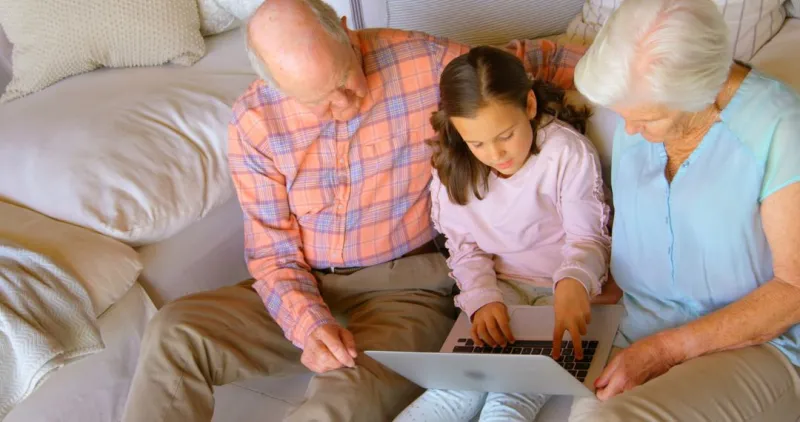
Photo: family passing laptop between generations at home, via pikwizard.com
Every family has an heirloom. Ours is a silver 2015 MacBook Pro 13-inch that I bought new the same month I went freelance. It has outlived two office desks, one kitchen-table era, a cross-country move from Chicago to Portland, and — as of last spring — its third owner.
What started as a work machine became my wife's everyday laptop, then our daughter's college computer. Along the way, we got pretty good at the handoff. Not just the technical part, either. There's an actual ritual to passing a Mac down that, done right, makes the next owner feel like they got something rather than a leftover.
Here's how the chain worked, stage by stage, and what I'd tell anyone setting up their own.
Stage One: Freelancer to Spouse (The Full Scrub)
When I upgraded to a new machine in 2019, the 2015 wasn't trade-in material. It was still fast enough for email, browsing, and light photo editing — which is exactly what my wife needed. But before she touched it, it needed to stop being me.
The mistake most people make is deleting files manually and calling it done. That leaves breadcrumbs everywhere: saved Wi-Fi networks, browser autofill, Messages history, app licenses tied to your Apple ID.
My process instead:
- Sign out of everything first. iCloud, iMessage, FaceTime, the App Store. This is the step people skip and then can't figure out why Activation Lock is haunting the next owner.
- Deauthorize the machine from iTunes/Apple Music and any Adobe or Creative Cloud accounts.
- Back up once, verify the backup, then wipe. A Time Machine snapshot to an external drive, confirmed restorable, before I even thought about erasing.
- Erase and reinstall macOS via Recovery Mode, so the new owner boots into a clean system.
Twenty minutes of work. What my wife got was a machine that felt like hers on day one, not a haunted house full of my old tabs.
The Accessories Travel With It
A hand-me-down Mac is only as good as the stuff around it, and I'd argue the accessories matter more at the second and third owner stage than the first.
The 2015 went into its second life with its original charger (the third-party replacements from that era were genuinely bad), a hard shell case I'd never used, and — the real MVP — a USB-C hub I bought for $19. Old Macs mean old ports, and whoever gets the machine next shouldn't have to solve the dongle problem themselves.
We also passed along a fresh keyboard cover and a note with the battery's cycle count. That last one sounds nerdy, but it set expectations: my wife knew going in that the battery was at about 60% of original capacity, so nobody was surprised when it needed to stay near an outlet. Honesty about a machine's limits is the difference between a hand-me-down and a disappointment.
Stage Two: Spouse to College Student (The Reset That Isn't)
Four years later, my wife got a MacBook Air of her own, and the 2015 headed to our daughter's dorm at the University of Oregon. This handoff was different. By now the machine had accumulated four years of her stuff, and while a full wipe was still the move, the prep work changed.
A few things we did differently the second time:
- Set up Family Sharing properly before the wipe, so my daughter could restore apps she was entitled to without needing my password mid-semester.
- Upgraded the RAM... just kidding. It's a 2015. But we did put in a fresh third-party battery for about $90 through an independent repair shop in Portland. Cheaper than a new laptop by a wide margin.
- Replaced the thermal paste. A 2015 MacBook Pro that's been running for years runs hot. A $15 tube and a Saturday afternoon dropped its temps noticeably.
- Wrote down the firmware password situation (there wasn't one, but check before you hand a machine to a kid 800 miles away).
Then the same core ritual: sign out, deauthorize, back up, erase, reinstall. My daughter booted it for the first time in her dorm room, signed into her own Apple ID, and it was hers.
What Seven Years Taught Us
The obvious lesson is that Macs last. A nine-year-old laptop starting its fourth year of duty — it's now on a cousin's desk as a writing machine — is a small rebuke to the idea that computers need replacing every three.
But the less obvious lesson is that the handoff is a skill. Each transfer worked because someone spent an hour treating the machine like a gift instead of a castoff. Wipe it clean. Be honest about the battery. Include the charger. Set up the next person's Apple ID path before they're stuck without one.
If you've got an old Mac sitting in a drawer, that's the playbook. The machine's fine. It just needs a next chapter — and someone willing to write a decent handoff note.